
E24.ai
Designing E42’s Experience to Drive Adoption and Scale
The brief:
E42’s AI tools were powerful but overwhelming.
Think: enterprise UX wrapped in chaos.
The brief:
E42’s AI tools were powerful but overwhelming.
Think: enterprise UX wrapped in chaos.
My role:
Redesigned the entire AI configurator and chatbot experiences. Strategy + UX + UI (along with the team)
My role:
Redesigned the entire AI configurator and chatbot experiences. Strategy + UX + UI (along with the team)
What I did
1. Simplified complex workflows into clear, user-friendly paths
2. Created a dark theme for power users and a light theme for conversation-first users
3. Reduced support queries by surfacing AI capabilities just when users needed them
What I did
1. Simplified complex workflows into clear, user-friendly paths
2. Created a dark theme for power users and a light theme for conversation-first users
3. Reduced support queries by surfacing AI capabilities just when users needed them
Why it worked:
We made AI feel less robotic, more human. Users stopped calling for help—and started using the tools more deeply.
Why it worked:
We made AI feel less robotic, more human. Users stopped calling for help—and started using the tools more deeply.
See how we redesigned complexity into clarity

Introduction
Introduction
E42 is a no-code AI platform that helps businesses automate complex tasks using AI-powered digital co-workers. It is best known for its conversational AI solutions, which provide natural, human-like interactions while keeping data secure and adaptable. This case study explores how an AI configurator and chatbot were developed for E42, highlighting the challenges, solutions, and outcomes.
E42 is a no-code AI platform that helps businesses automate complex tasks using AI-powered digital co-workers. It is best known for its conversational AI solutions, which provide natural, human-like interactions while keeping data secure and adaptable. This case study explores how an AI configurator and chatbot were developed for E42, highlighting the challenges, solutions, and outcomes.
Challenge
Challenge
E42 wanted to improve its product experience by introducing well-designed configurators and a better AI- Worker interface for the consumer of the business. The main challenges were:
Complexity in Navigation — Users found it difficult to interact with and configure AI Workers due to a cluttered and unintuitive interface, leading to inefficiencies and frustration.
Rigid Configuration Process — The existing setup lacked user-friendly customization options, making it difficult for businesses to adapt AI Workers to their specific needs without technical support.
Low Engagement & Adoption — The interface did not effectively communicate the AI Workers’ capabilities, resulting in lower user adoption and underutilization of key features.
E42 wanted to improve its product experience by introducing well-designed configurators and a better AI- Worker interface for the consumer of the business. The main challenges were:
Complexity in Navigation — Users found it difficult to interact with and configure AI Workers due to a cluttered and unintuitive interface, leading to inefficiencies and frustration.
Rigid Configuration Process — The existing setup lacked user-friendly customization options, making it difficult for businesses to adapt AI Workers to their specific needs without technical support.
Low Engagement & Adoption — The interface did not effectively communicate the AI Workers’ capabilities, resulting in lower user adoption and underutilization of key features.
Why This Problem Matters
Why This Problem Matters
The challenges in developing AI chatbots matter because:
Poorly designed chatbots can lead to negative customer experiences, reducing trust and engagement.
Effective conversational AI systems can help businesses automate processes, reduce costs, and improve scalability.
Addressing these issues is critical for ensuring ethical AI practices, safeguarding user privacy, and maintaining compliance with regulations.
The challenges in developing AI chatbots matter because:
Poorly designed chatbots can lead to negative customer experiences, reducing trust and engagement.
Effective conversational AI systems can help businesses automate processes, reduce costs, and improve scalability.
Addressing these issues is critical for ensuring ethical AI practices, safeguarding user privacy, and maintaining compliance with regulations.
Who Does It Impact?
Who Does It Impact?
Businesses: Companies across industries rely on chatbots to improve customer service, sales support, and operational efficiency.
Customers: Users expect seamless interactions with chatbots that understand their needs and provide accurate responses.
Developers: Teams working on chatbot development face technical constraints that require innovative solutions to deliver high-quality systems.
Businesses: Companies across industries rely on chatbots to improve customer service, sales support, and operational efficiency.
Customers: Users expect seamless interactions with chatbots that understand their needs and provide accurate responses.
Developers: Teams working on chatbot development face technical constraints that require innovative solutions to deliver high-quality systems.
Project Scope
Project Scope
This project was done in 2 phases — phase one was configurator design that allows businesses to completely customize their chatbot according to their business needs. Phase two was designing an AI chatbot that would be customized and will be displayed on the end consumer’s screen. So this was a B2B2C scope.
This project was done in 2 phases — phase one was configurator design that allows businesses to completely customize their chatbot according to their business needs. Phase two was designing an AI chatbot that would be customized and will be displayed on the end consumer’s screen. So this was a B2B2C scope.
This case study contains a lot of technical terms that you and I won't understand — so I take it upon myself to explain it to like you’re 5 — ELI5 for the win.
This case study contains a lot of technical terms that you and I won't understand — so I take it upon myself to explain it to like you’re 5 — ELI5 for the win.
Phase 01 — Designing the Configurator
Phase 01 — Designing the Configurator
The configurator is a no-code tool that lets users create, customize, and manage AI Workers without technical expertise.It streamlines the setup process with intuitive interfaces, making complex workflows easy to configure.
The configurator is a no-code tool that lets users create, customize, and manage AI Workers without technical expertise.It streamlines the setup process with intuitive interfaces, making complex workflows easy to configure.
Research
Research
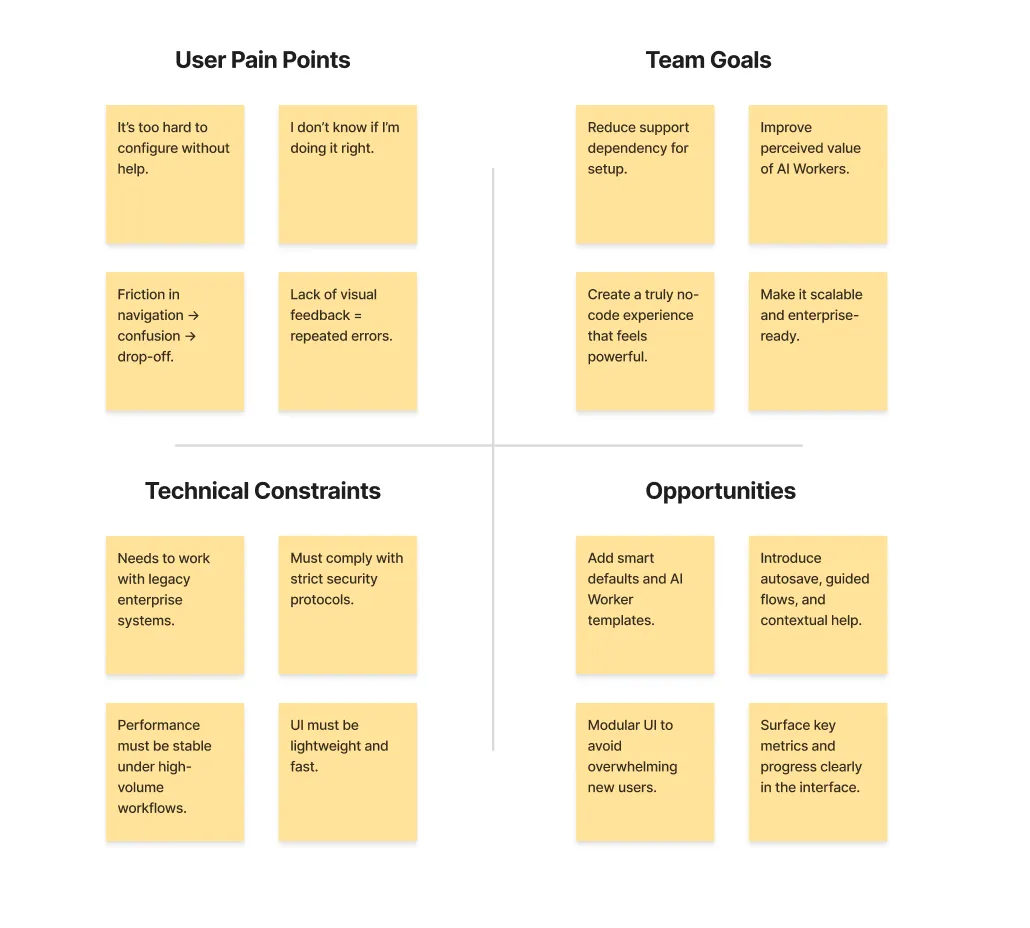
This was a problem statement we had never encountered before and it was so far away from my life, the research was mainly a LOT of interviews with the internal team — as they had the most idea of what the tool was and what it was supposed to do.
The research process went on for about a month — a lot of discussion with the interal team. It was a pandora box waiting to be discovered.
This is the summary of the research —
This was a problem statement we had never encountered before and it was so far away from my life, the research was mainly a LOT of interviews with the internal team — as they had the most idea of what the tool was and what it was supposed to do.
The research process went on for about a month — a lot of discussion with the interal team. It was a pandora box waiting to be discovered.
This is the summary of the research —
Iterate, Iterate, Iterate
Iterate, Iterate, Iterate
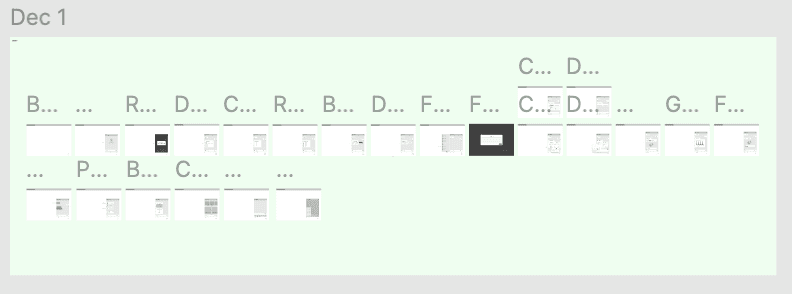
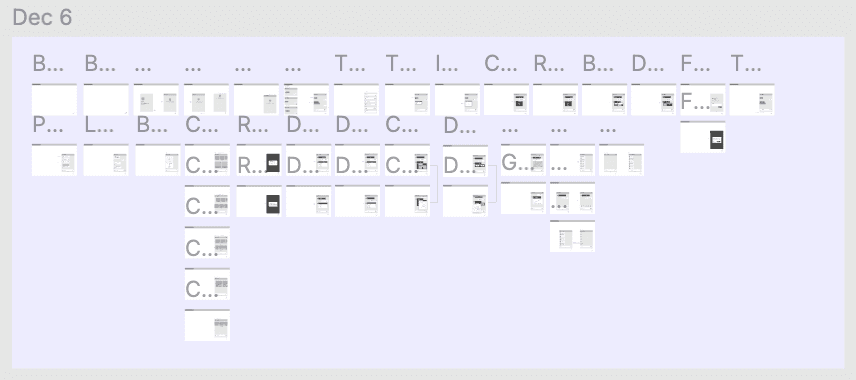
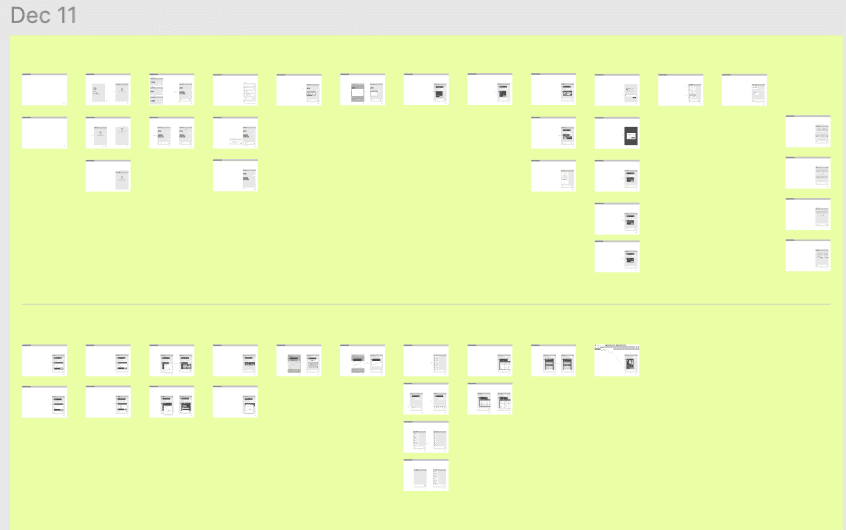
After we got the insights, there was a long road of iteration and feedback. We tried a lot ideas — through continuous refinement, we translated complexity into clarity — at scale.
After we got the insights, there was a long road of iteration and feedback. We tried a lot ideas — through continuous refinement, we translated complexity into clarity — at scale.
Visual Direction
Visual Direction
After multiple rounds of iteration, the final product offered a significantly enhanced user experience, aligning with E42’s strategic goals of improved customer satisfaction and operational efficiency.
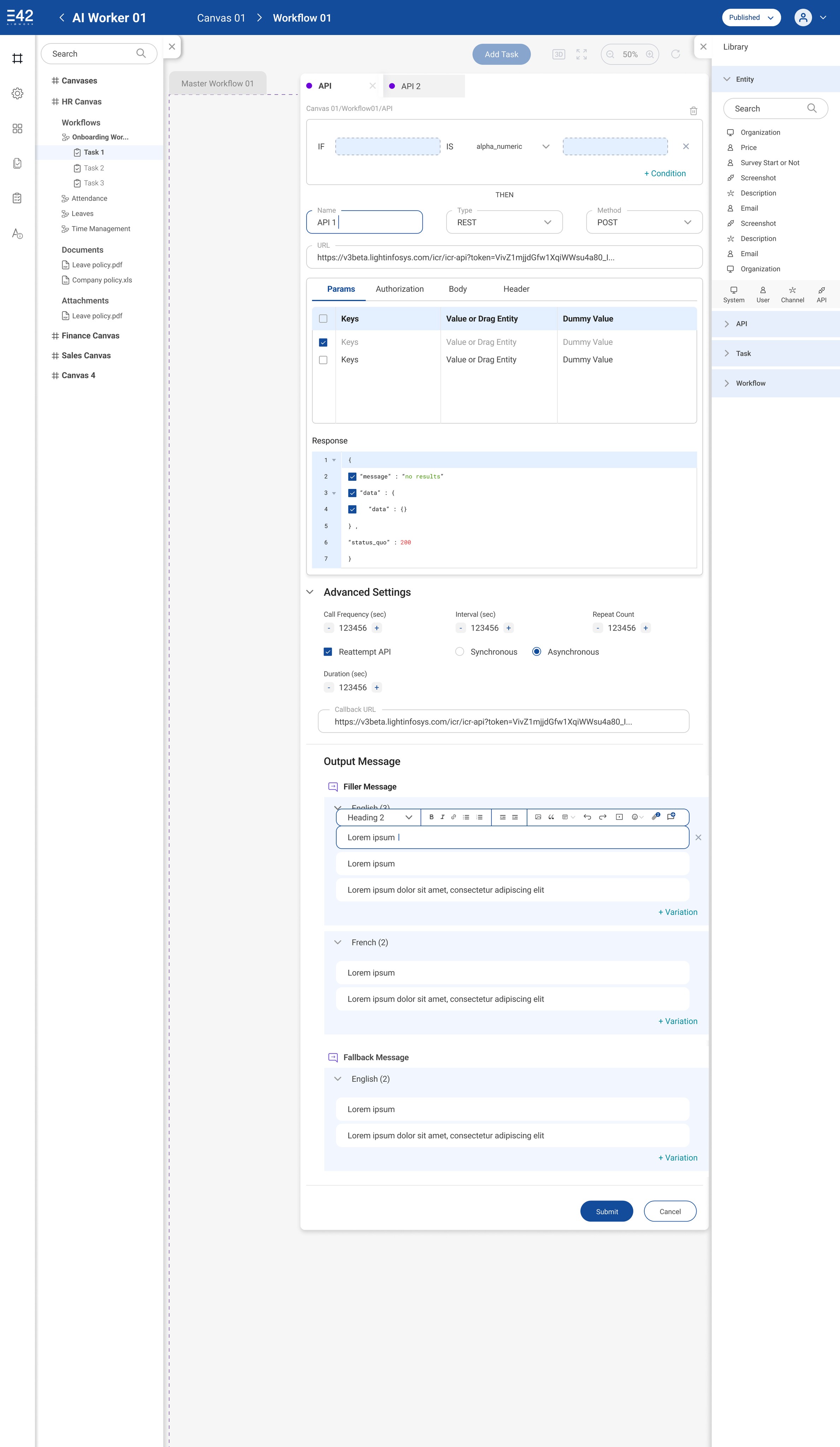
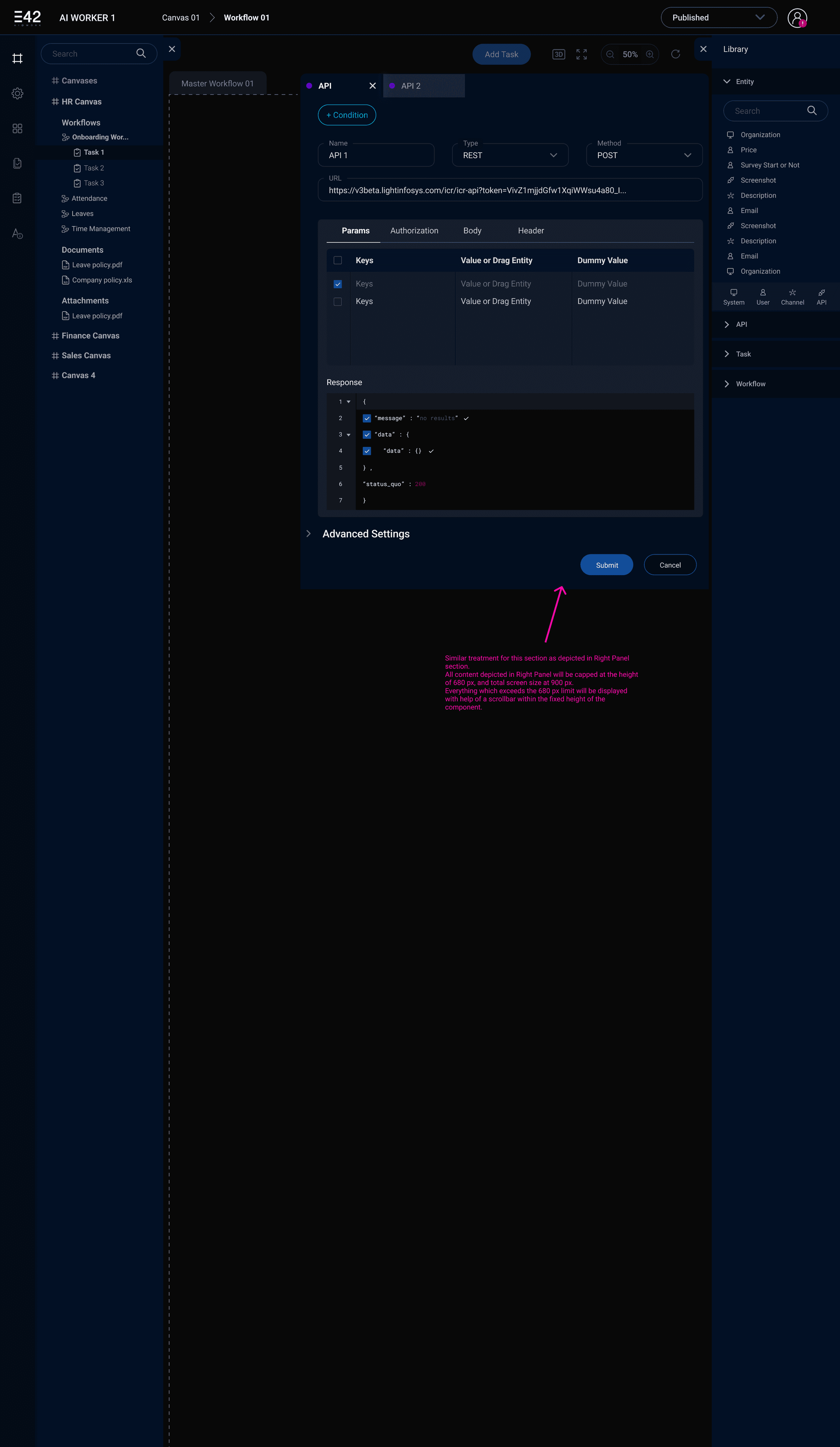
For the visual design — we tried both dark and light themes for the configurator as shown below.
After talking to a lot of internal team members, we got the insight that sometimes a user can be on the screen for up to 14 hours. Based on that insight, we chose to go ahead with the dark theme.
After multiple rounds of iteration, the final product offered a significantly enhanced user experience, aligning with E42’s strategic goals of improved customer satisfaction and operational efficiency.
For the visual design — we tried both dark and light themes for the configurator as shown below.
After talking to a lot of internal team members, we got the insight that sometimes a user can be on the screen for up to 14 hours. Based on that insight, we chose to go ahead with the dark theme.
Homescreen
Homescreen
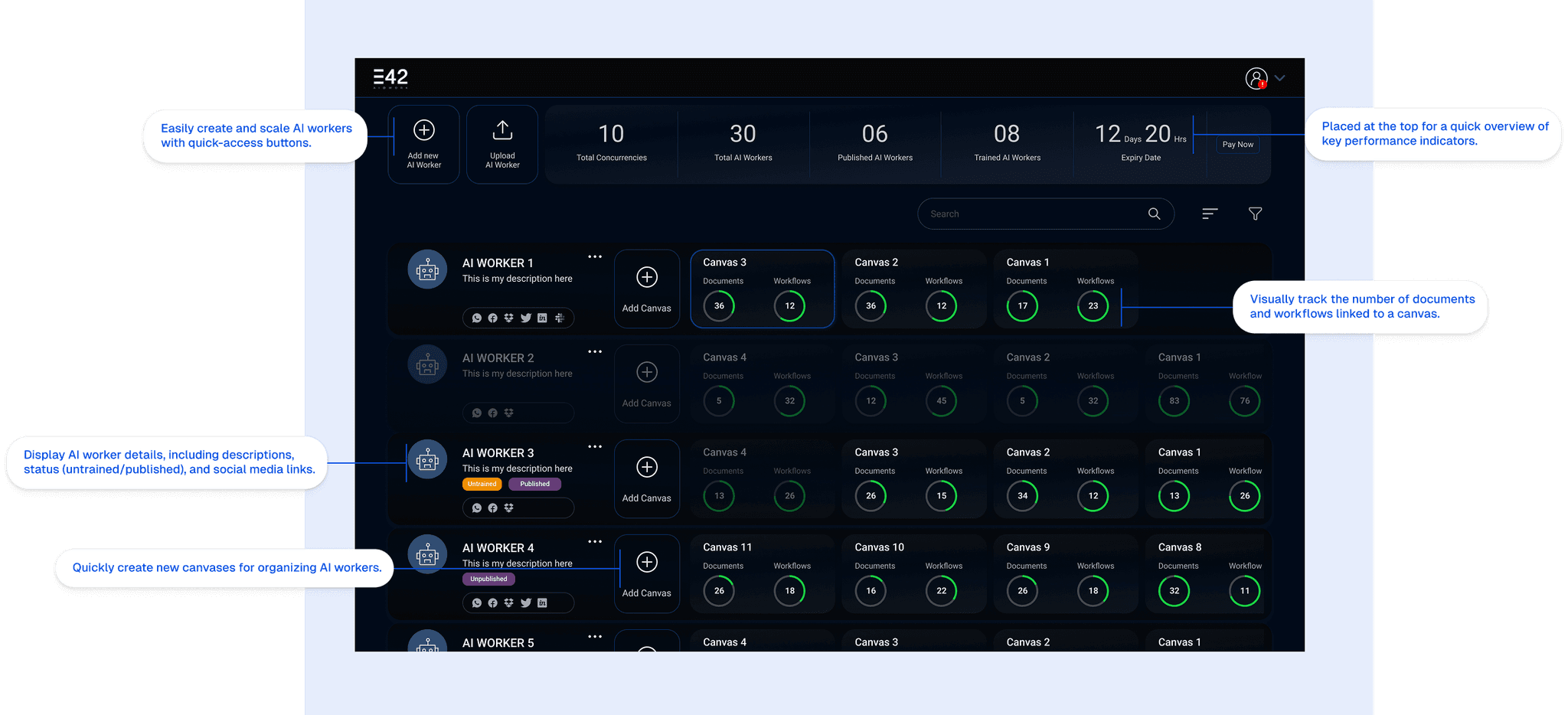
The screen presents a dashboard-style interface for managing AI workers and their associated canvases. It provides a high-level overview of key metrics, individual AI worker details, and the status of their workflows and documents.
ELI5 — This screen is like a control panel for robot helpers!
What are the most critical metrics users need to see immediately? This led to the placement of key metrics such as “Total Concurrencies,” “Total AI Workers,” “Published AI Workers,” “Trained AI Workers,” and “Expiry Date” at the top of the dashboard.
How can we best represent the relationship between AI workers and canvases? The card-based layout was chosen to visually group AI workers with their associated canvases, providing a clear connection between them.
How can we indicate the status of documents and workflows within each canvas? Circular progress indicators were used to show the number of documents and workflows associated with each canvas, providing a quick visual cue of their completion status.
How can we make it easy for users to find specific AI workers and canvases? A search bar and potential filter options (indicated by the filter icon) were included to facilitate efficient navigation and filtering.
The screen presents a dashboard-style interface for managing AI workers and their associated canvases. It provides a high-level overview of key metrics, individual AI worker details, and the status of their workflows and documents.
ELI5 — This screen is like a control panel for robot helpers!
What are the most critical metrics users need to see immediately? This led to the placement of key metrics such as “Total Concurrencies,” “Total AI Workers,” “Published AI Workers,” “Trained AI Workers,” and “Expiry Date” at the top of the dashboard.
How can we best represent the relationship between AI workers and canvases? The card-based layout was chosen to visually group AI workers with their associated canvases, providing a clear connection between them.
How can we indicate the status of documents and workflows within each canvas? Circular progress indicators were used to show the number of documents and workflows associated with each canvas, providing a quick visual cue of their completion status.
How can we make it easy for users to find specific AI workers and canvases? A search bar and potential filter options (indicated by the filter icon) were included to facilitate efficient navigation and filtering.
Features
Features
This screen is designed to configure advanced properties of the AI worker, such as chat behavior, menu types, and additional functionalities.
Chat Properties: Features like emoji support, history tracking, weather updates, and animation load pages are included to enrich user engagement and personalization.
Motivation: Make conversations more interactive and tailored to user preferences.
Hamburger Menu Customization: Options for horizontal/vertical menu layouts and custom labels allow flexibility in UI design to suit different platforms or branding needs.
Motivation: Provide adaptability for diverse user interfaces.
Image Upload: Enabling users to upload custom images for minimized chat windows ensures branding consistency across all elements of the chatbot interface.
Motivation: Empower businesses with tools for personalization and cohesive branded experience.
This screen is designed to configure advanced properties of the AI worker, such as chat behavior, menu types, and additional functionalities.
Chat Properties: Features like emoji support, history tracking, weather updates, and animation load pages are included to enrich user engagement and personalization.
Motivation: Make conversations more interactive and tailored to user preferences.
Hamburger Menu Customization: Options for horizontal/vertical menu layouts and custom labels allow flexibility in UI design to suit different platforms or branding needs.
Motivation: Provide adaptability for diverse user interfaces.
Image Upload: Enabling users to upload custom images for minimized chat windows ensures branding consistency across all elements of the chatbot interface.
Motivation: Empower businesses with tools for personalization and cohesive branded experience.
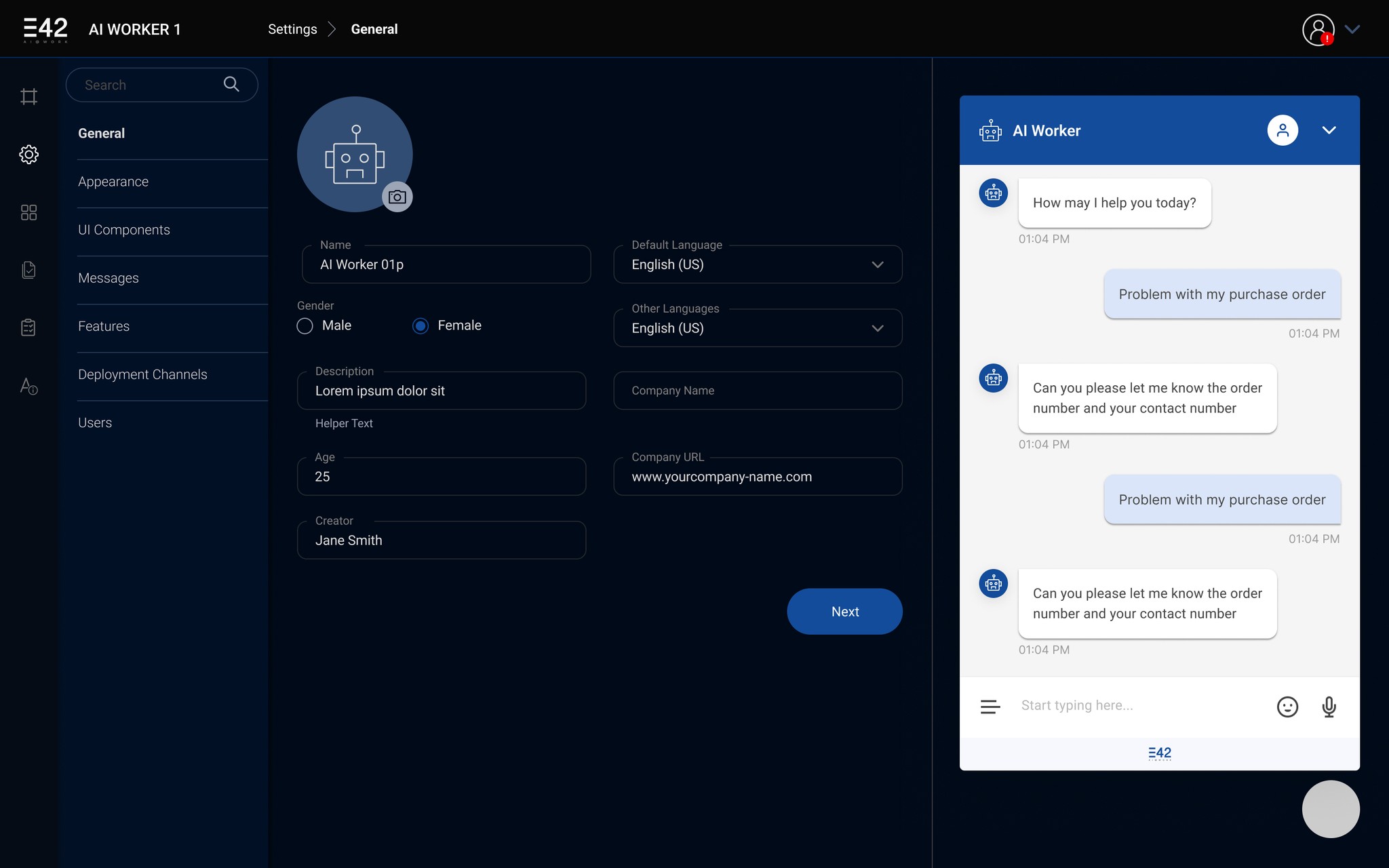
4. Toggleable Features: Advanced options like autocomplete, voice support, display delay, web search, and small talk provide granular control over chatbot functionality.
Motivation: Cater to both basic and advanced user needs without compromising simplicity.
5. Save as Template: Allowing users to save configurations as templates enables efficient reuse across projects, reducing repetitive work.
Motivation: Improve productivity for users managing multiple bots or projects.
6. Live Preview Panel: The live preview ensures users can immediately see how their configurations affect the bot’s behavior and appearance in real-time.
4. Toggleable Features: Advanced options like autocomplete, voice support, display delay, web search, and small talk provide granular control over chatbot functionality.
Motivation: Cater to both basic and advanced user needs without compromising simplicity.
5. Save as Template: Allowing users to save configurations as templates enables efficient reuse across projects, reducing repetitive work.
Motivation: Improve productivity for users managing multiple bots or projects.
6. Live Preview Panel: The live preview ensures users can immediately see how their configurations affect the bot’s behavior and appearance in real-time.
SAD —
SAD —
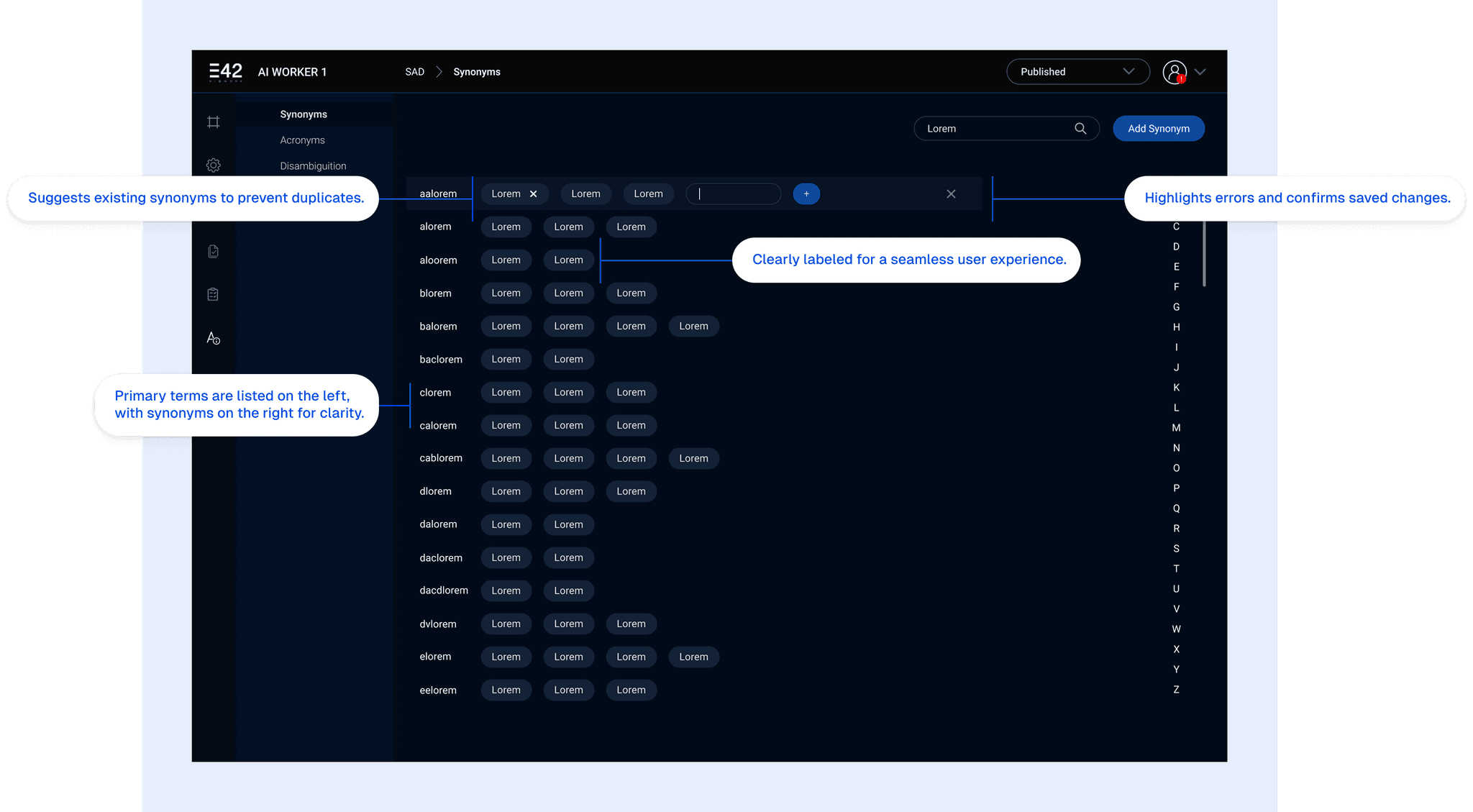
ELI5 — This screen helps us teach the AI Worker different words that mean the same thing. Like “happy” and “glad”! We can make sure it knows lots of ways to say the same thing. This way, it understands everyone better.
Goal: To create an intuitive interface for managing synonyms, acronyms, and disambiguation within the AI Worker system. This screen focuses specifically on synonyms.
Clear Layout: The screen is divided into sections for viewing existing synonyms, adding new synonyms, and managing disambiguation rules.
Efficient Input: The design allows for quick and easy addition of synonyms.
ELI5 — This screen helps us teach the AI Worker different words that mean the same thing. Like “happy” and “glad”! We can make sure it knows lots of ways to say the same thing. This way, it understands everyone better.
Goal: To create an intuitive interface for managing synonyms, acronyms, and disambiguation within the AI Worker system. This screen focuses specifically on synonyms.
Clear Layout: The screen is divided into sections for viewing existing synonyms, adding new synonyms, and managing disambiguation rules.
Efficient Input: The design allows for quick and easy addition of synonyms.
Questions answered through the design
Questions answered through the design
How can we present synonyms in a way that’s easy to scan and understand?
What input methods will be most efficient for adding new synonyms?
How can we prevent users from accidentally creating duplicate entries?
How can we provide feedback to the user to confirm that their changes have been saved?
How can we present synonyms in a way that’s easy to scan and understand?
What input methods will be most efficient for adding new synonyms?
How can we prevent users from accidentally creating duplicate entries?
How can we provide feedback to the user to confirm that their changes have been saved?
ICR (Intelligent Content Recognizers)
ICR (Intelligent Content Recognizers)
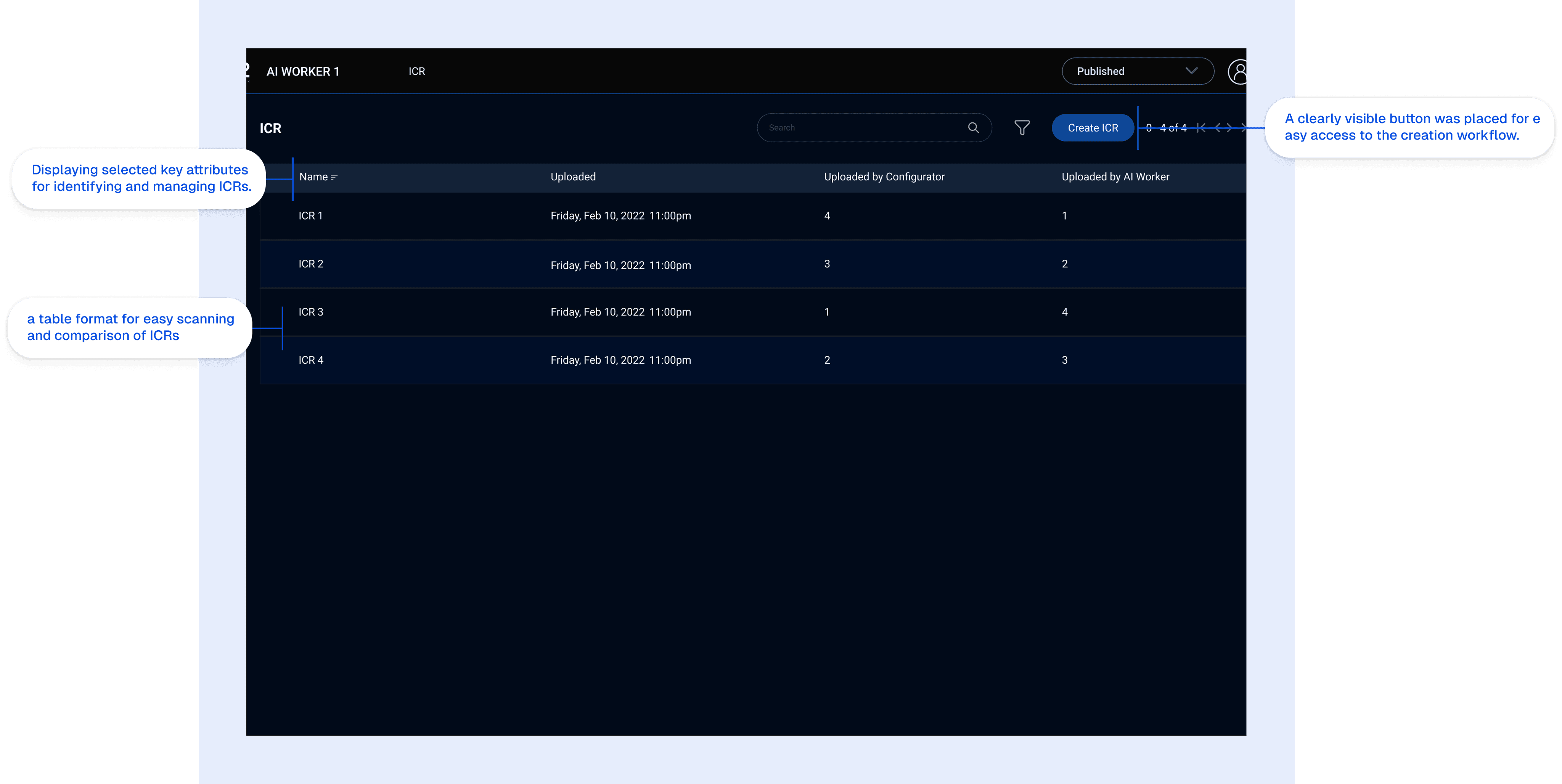
This screen displays a list of ICRs (Intelligent Content Recognizers), showing their names, upload dates, who uploaded them, and who configured/used them.
ELI5: This screen is like a list of helpers (ICRs). It shows their names and when they were made. You can also make a new helper here! It’s like a roster of all the helpers available to do a specific task.
This screen displays a list of ICRs (Intelligent Content Recognizers), showing their names, upload dates, who uploaded them, and who configured/used them.
ELI5: This screen is like a list of helpers (ICRs). It shows their names and when they were made. You can also make a new helper here! It’s like a roster of all the helpers available to do a specific task.
Thought Process:
Thought Process:
Understanding the Purpose: The screen’s primary goal is to allow users to manage their ICRs.
Identifying Key Data Points: Deciding which attributes of an ICR are most important to display.
Selecting the Right Display Method: Choosing a table format for its clarity and efficiency.
Prioritizing Actions: Making the “Create ICR” action easily accessible.
Understanding the Purpose: The screen’s primary goal is to allow users to manage their ICRs.
Identifying Key Data Points: Deciding which attributes of an ICR are most important to display.
Selecting the Right Display Method: Choosing a table format for its clarity and efficiency.
Prioritizing Actions: Making the “Create ICR” action easily accessible.
Logs
Logs
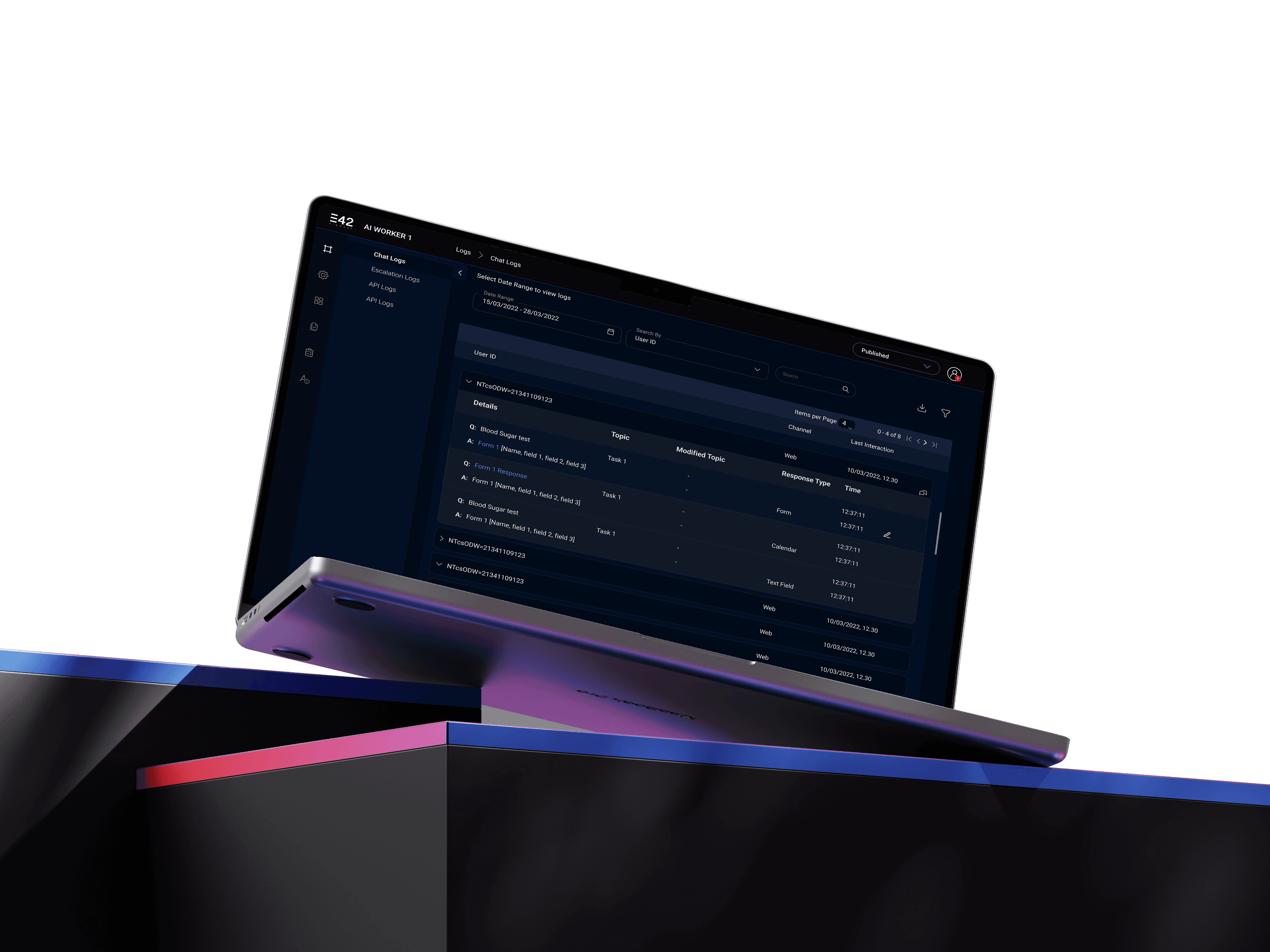
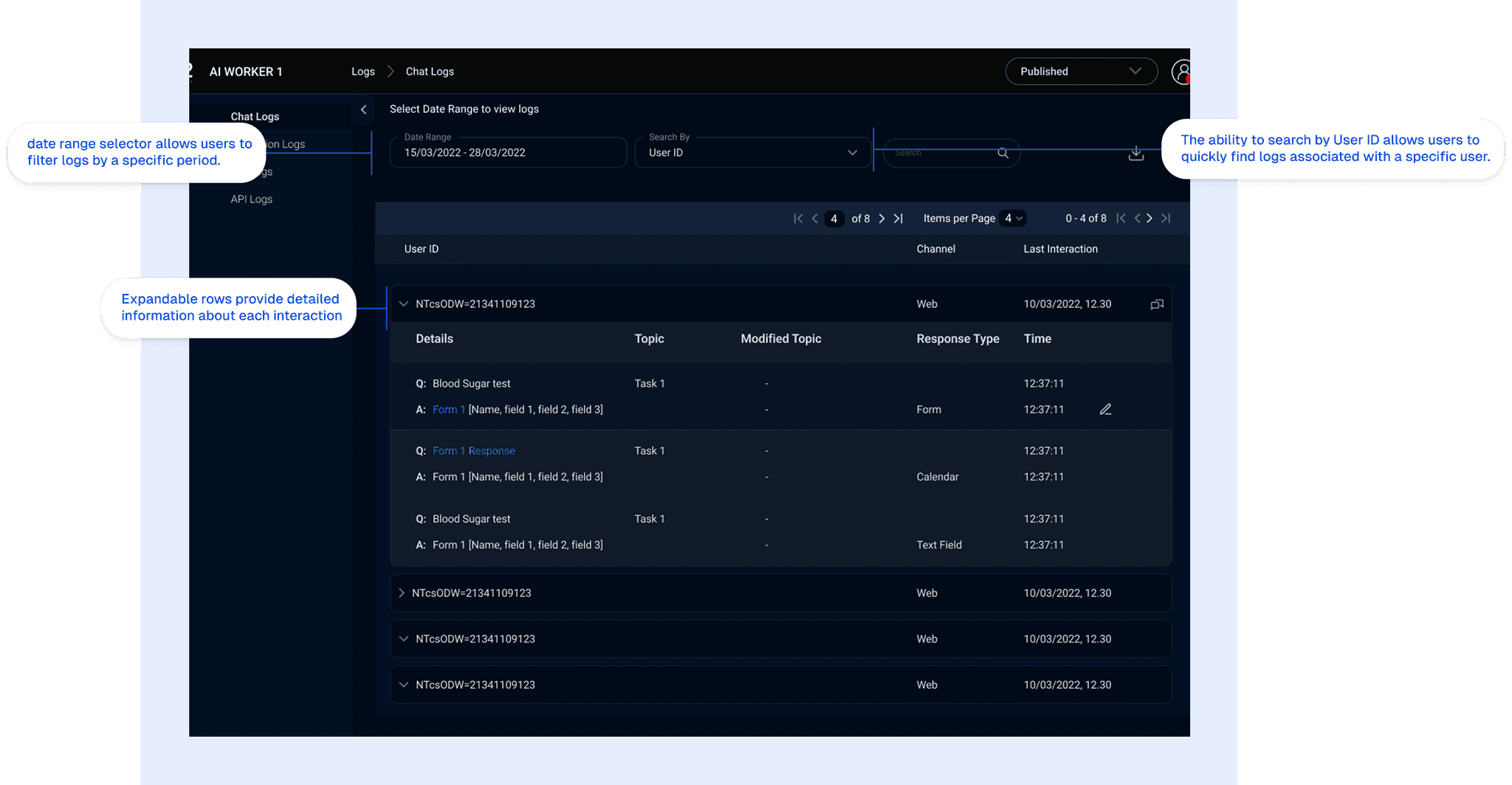
This screen shows chat logs, including date ranges, user IDs, channel, and last interaction details.
ELI5: This screen shows what people are saying to the computer. It’s like a record of all the conversations. You can find the chats you are looking for, by date or by the user who had the conversation.
Defining Log Access Needs: The primary goal is to allow users to access and analyze chat logs effectively.
Identifying Filtering Options: Determining the most useful filters for narrowing down the logs.
Structuring Log Information: Presenting the log data in a clear and organized manner.
Enabling Detailed Views: Providing access to detailed information for each log entry.
This screen shows chat logs, including date ranges, user IDs, channel, and last interaction details.
ELI5: This screen shows what people are saying to the computer. It’s like a record of all the conversations. You can find the chats you are looking for, by date or by the user who had the conversation.
Defining Log Access Needs: The primary goal is to allow users to access and analyze chat logs effectively.
Identifying Filtering Options: Determining the most useful filters for narrowing down the logs.
Structuring Log Information: Presenting the log data in a clear and organized manner.
Enabling Detailed Views: Providing access to detailed information for each log entry.
Triggers
Triggers
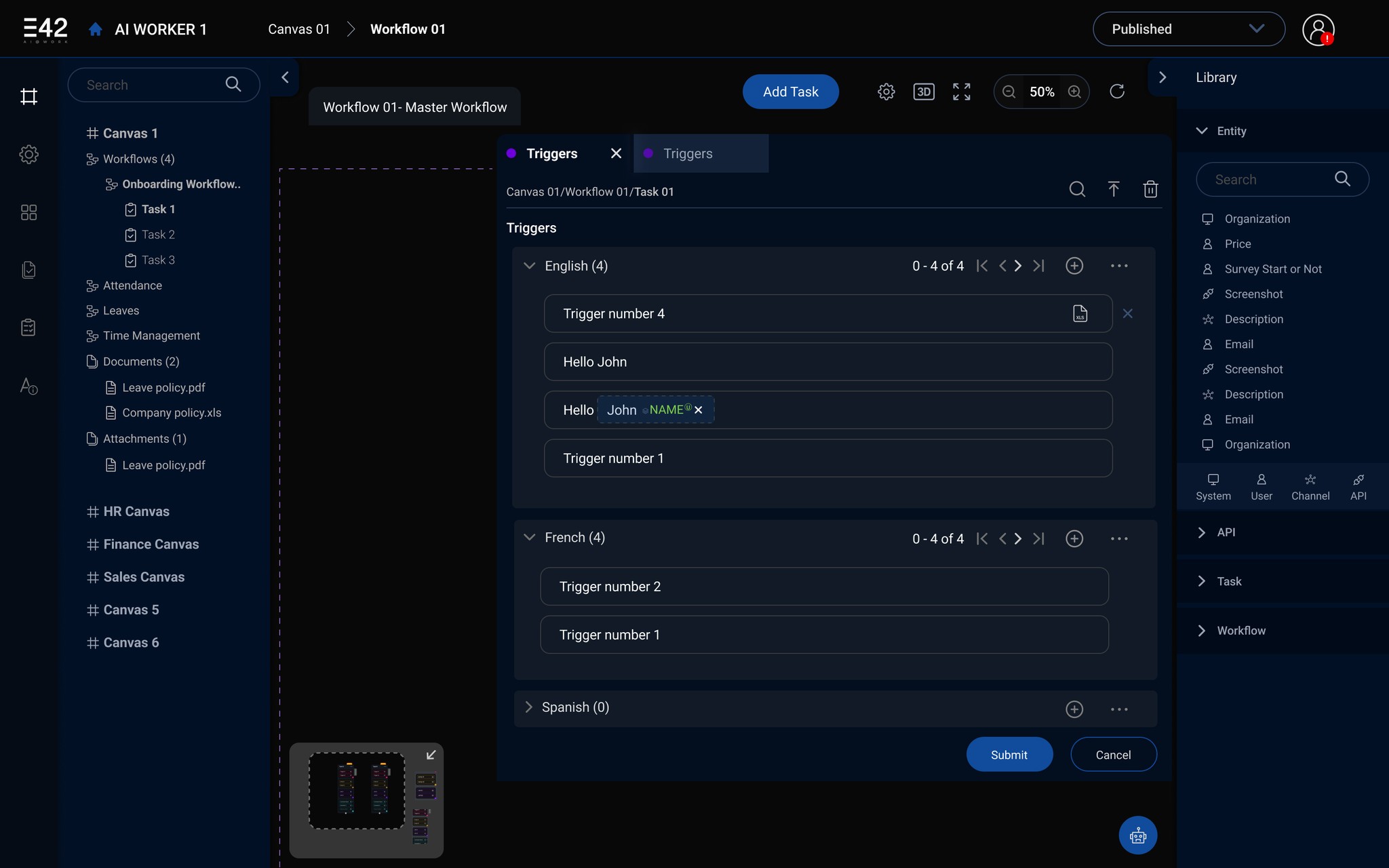
Provides a visual representation of the task flows and triggers within the AI Worker system. The aim was to make complex workflows easy to understand and manage.
Three-Panel Layout: Standard for productivity apps. Left sidebar for navigation, center for main content (triggers), right for library/resources.
Left Sidebar Navigation: Hierarchical structure for workflows/tasks. Mimics familiar file systems for ease of use.
Trigger Configuration (Center):
Multi-Language: Supports global use; collapsible sections manage complexity.
Variable Highlighting: Name is highlighted for easy identification of dynamic content.
Right “Library” Panel: Quick access to reusable entities/APIs. Reduces redundancy.
Provides a visual representation of the task flows and triggers within the AI Worker system. The aim was to make complex workflows easy to understand and manage.
Three-Panel Layout: Standard for productivity apps. Left sidebar for navigation, center for main content (triggers), right for library/resources.
Left Sidebar Navigation: Hierarchical structure for workflows/tasks. Mimics familiar file systems for ease of use.
Trigger Configuration (Center):
Multi-Language: Supports global use; collapsible sections manage complexity.
Variable Highlighting: Name is highlighted for easy identification of dynamic content.
Right “Library” Panel: Quick access to reusable entities/APIs. Reduces redundancy.
Dashboard
Dashboard
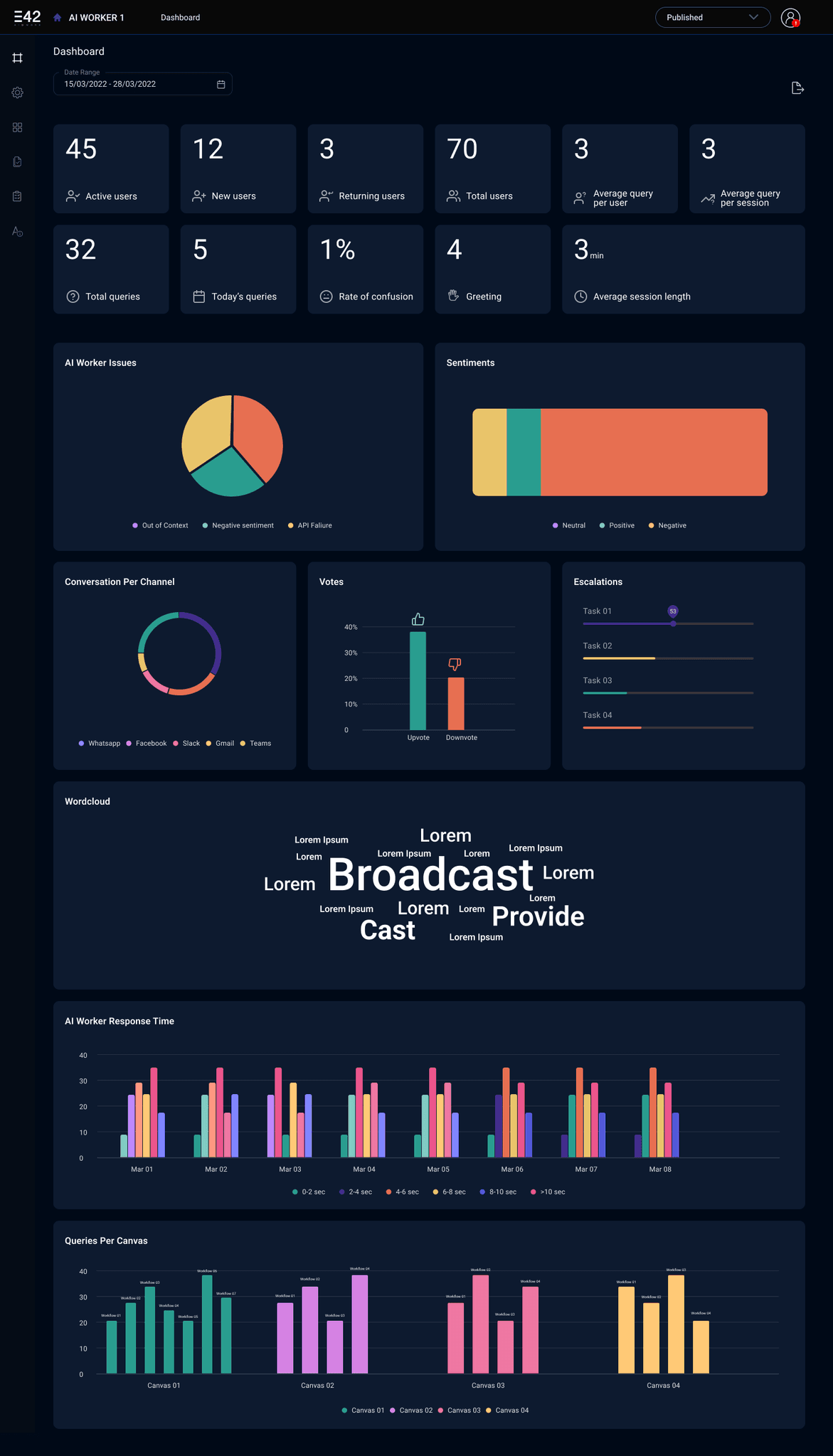
This screen presents a high-level overview of the AI Worker’s performance and key metrics at a glance. I wanted to give the user an immediate sense of the system’s health and activity.
Information Hierarchy: I started by identifying the core metrics (active users, query volume, etc.). These were placed at the top for immediate visibility.
Data Visualization: I chose chart types (pie charts, bar graphs, word clouds) based on the type of data being presented. I aimed for a balance between visual appeal and data clarity.
Layout and Spacing: I used a grid system to ensure a clean and organized layout. White space was used to prevent the dashboard from feeling cluttered.
Color Palette: A limited color palette was used to maintain visual consistency. Accent colors were used to highlight important data points.
This screen presents a high-level overview of the AI Worker’s performance and key metrics at a glance. I wanted to give the user an immediate sense of the system’s health and activity.
Information Hierarchy: I started by identifying the core metrics (active users, query volume, etc.). These were placed at the top for immediate visibility.
Data Visualization: I chose chart types (pie charts, bar graphs, word clouds) based on the type of data being presented. I aimed for a balance between visual appeal and data clarity.
Layout and Spacing: I used a grid system to ensure a clean and organized layout. White space was used to prevent the dashboard from feeling cluttered.
Color Palette: A limited color palette was used to maintain visual consistency. Accent colors were used to highlight important data points.
These were some of the most important screens from the configurator. The overall aim was achieved according to the team.
These were some of the most important screens from the configurator. The overall aim was achieved according to the team.
Phase 2 — Designing the Chatbot Interface
Phase 2 — Designing the Chatbot Interface
This was mostly the visual aspect of the project.
We iterated a lot to finally come up with these 4 options —
This was mostly the visual aspect of the project.
We iterated a lot to finally come up with these 4 options —
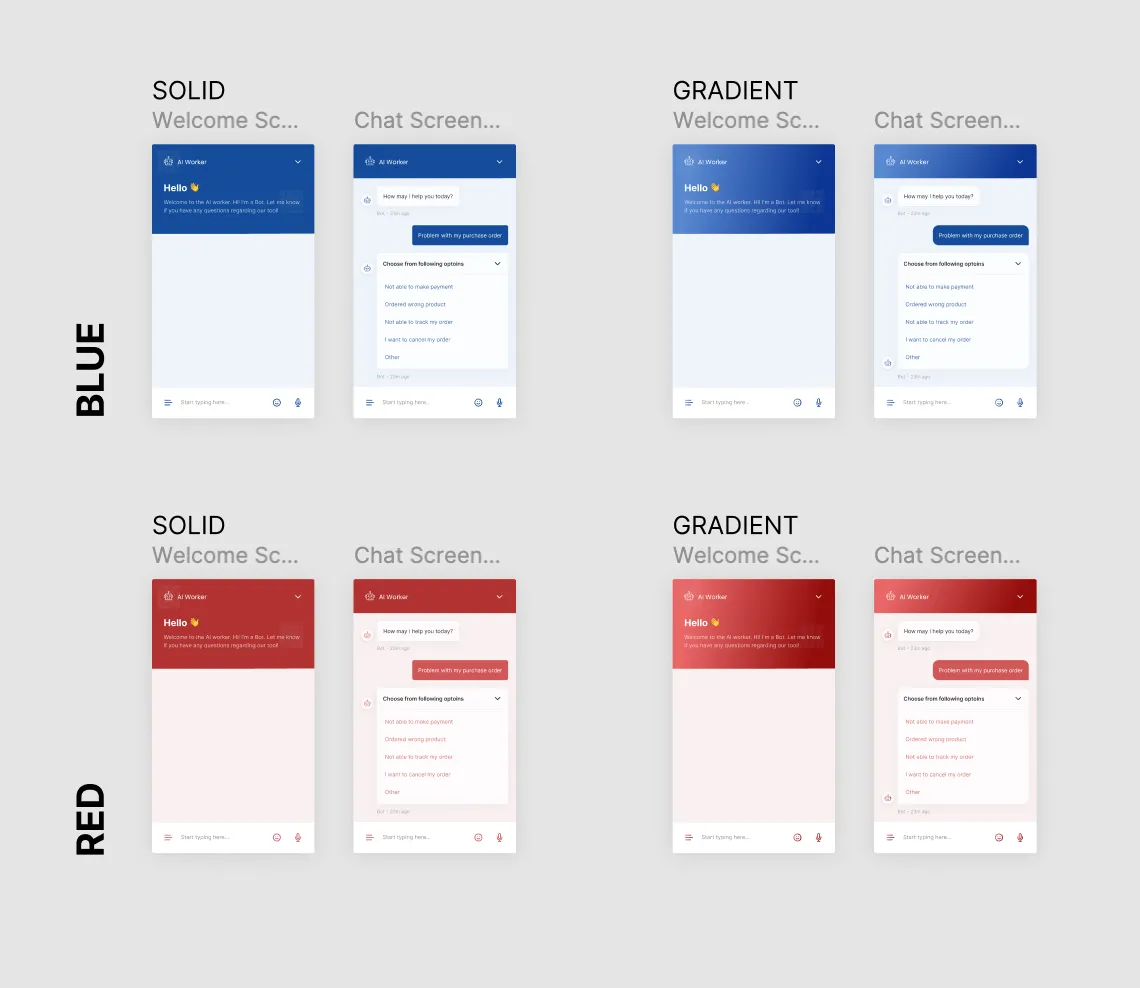
After a lot of discussion with the client, we decided to go ahead with the Blue solid theme.
After a lot of discussion with the client, we decided to go ahead with the Blue solid theme.
Design System
Design System
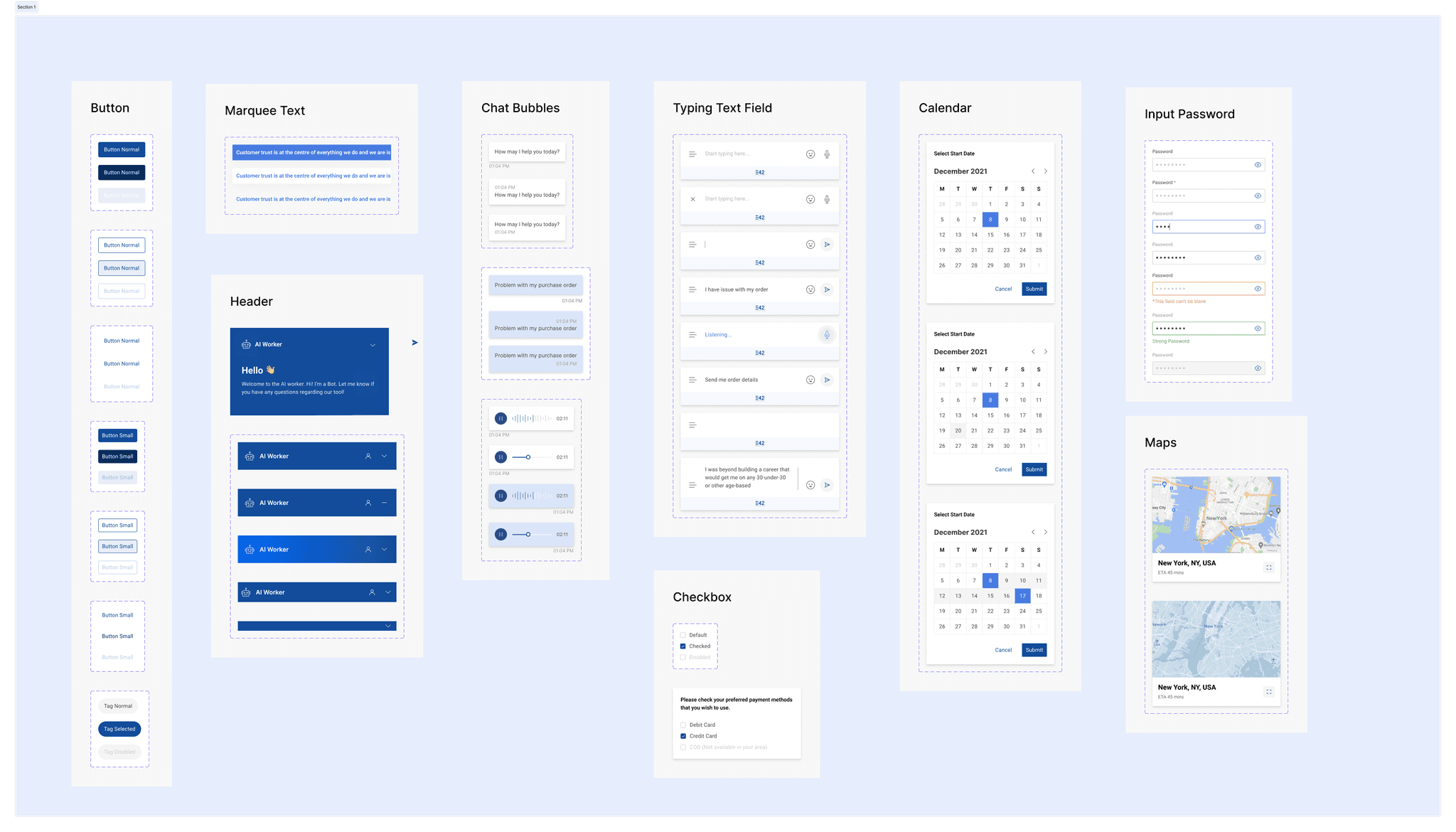
A design system for this because these components were the building blocks of the chat interface.
A design system for this because these components were the building blocks of the chat interface.
Scalability — A well-defined system makes it easier to add new components, features, and pages without breaking design consistency.
Consistency — Ensures that elements like buttons, typography, icons, and colors remain uniform across the platform, improving usability.
Efficiency — Reusable UI components reduce design and development time, making the workflow more agile.
Scalability — A well-defined system makes it easier to add new components, features, and pages without breaking design consistency.
Consistency — Ensures that elements like buttons, typography, icons, and colors remain uniform across the platform, improving usability.
Efficiency — Reusable UI components reduce design and development time, making the workflow more agile.
AI — Worker Screens
AI — Worker Screens
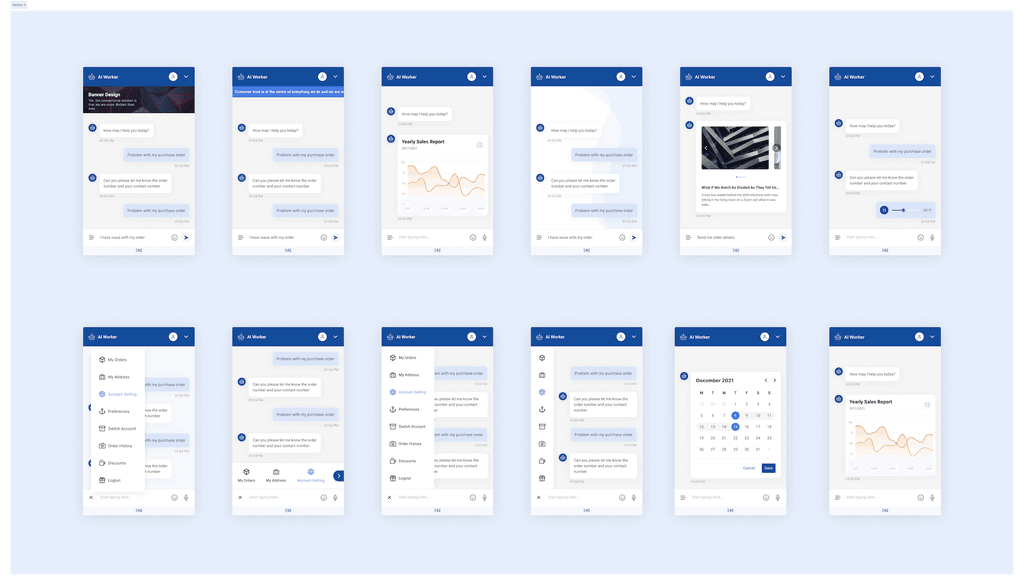
The E42 AI Worker screens showcase a versatile interface designed for enterprise cognitive process automation. Through a conversational AI format, users interact with an AI assistant capable of handling various tasks, from addressing customer inquiries to managing internal workflows. The screens display multiple functionalities, including quick-reply options, data visualization through charts (e.g., yearly sales reports), media integration, and task management features like calendar scheduling.
The E42 AI Worker screens showcase a versatile interface designed for enterprise cognitive process automation. Through a conversational AI format, users interact with an AI assistant capable of handling various tasks, from addressing customer inquiries to managing internal workflows. The screens display multiple functionalities, including quick-reply options, data visualization through charts (e.g., yearly sales reports), media integration, and task management features like calendar scheduling.
Key Learnings
Key Learnings
1. Start with real problems, not assumptions
Talking to internal teams early helped uncover issues that weren’t obvious in the interface — like hesitation, fear of missteps, and dependency on tech support. These became the foundation for design decisions.
2. Iteration isn’t optional — it’s the process
Every improvement came from testing, feedback, and revisiting what didn’t work. From microcopy to full workflows, we refined constantly until the product felt seamless.
3. Visual feedback builds trust
Small things — like save confirmations, progress indicators, and status labels — made a big difference in how users felt about interacting with AI Workers.
1. Start with real problems, not assumptions
Talking to internal teams early helped uncover issues that weren’t obvious in the interface — like hesitation, fear of missteps, and dependency on tech support. These became the foundation for design decisions.
2. Iteration isn’t optional — it’s the process
Every improvement came from testing, feedback, and revisiting what didn’t work. From microcopy to full workflows, we refined constantly until the product felt seamless.
3. Visual feedback builds trust
Small things — like save confirmations, progress indicators, and status labels — made a big difference in how users felt about interacting with AI Workers.
Thank you for reading this insanely long passage of work — immensely grateful. Please reach out for any queries or suggestions. There’s always room for growth :)
Thank you for reading this insanely long passage of work — immensely grateful. Please reach out for any queries or suggestions. There’s always room for growth :)
back to top
back to top
back to top